
COMPARE
Spreadsheet vs dashboard: why your numbers are old the moment you hit send
Most owners run the business from a spreadsheet they built themselves. It works, right up until you hit send. From that moment, every number in it starts getting older, and nobody updates it but you.

A spreadsheet is out of date the moment you send it
You pull sales from the register, check the bank, add up the bills and send the sheet to your manager or partner on Monday morning. By the time they open it, the store has already rung up new sales. By Wednesday, a bill has cleared that isn't on it. By Friday, it's describing a week that's already over.
That isn't a spreadsheet problem you can fix with better formulas. It's what a spreadsheet is: a picture of one moment, taken by hand. The business keeps moving after you take it.
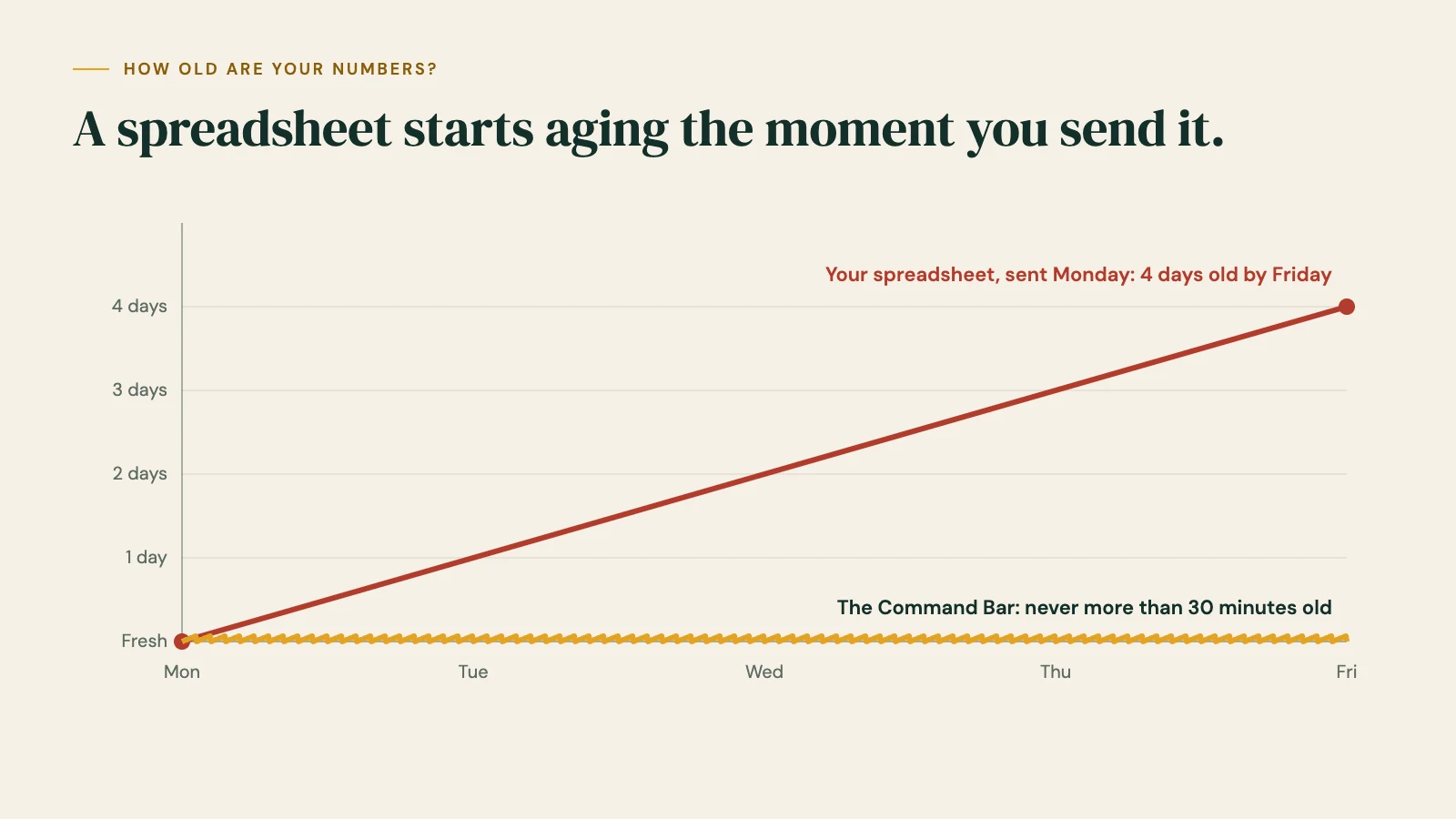
A small business dashboard works the other way around. Instead of you carrying numbers into a file, the numbers come to you: from your point of sale, your bank and your payroll, on their own, all day.
What each one is for
A spreadsheet is a blank page. It's the right tool for a one-off question: what if we raise prices 5%, what would a second location cost, can we afford another hire. Anything you type in, it can add up, and it's free.
The Command Bar is for the numbers that never stop changing. Sales, cash, bills, stock and team come in on their own every 30 minutes, and every Monday a short memo tells you the three things to do this week.
Spreadsheet vs the Command Bar, side by side
| Your spreadsheet | The Command Bar | |
|---|---|---|
| Cost to start | Free, or part of software you already pay for | From $1,500 setup and $199 a month |
| Who keeps it current | You, by hand | It updates itself every 30 minutes |
| How old the numbers are | As old as your last copy and paste | Never more than 30 minutes |
| After you send it | Out of date immediately | Everyone sees the same live numbers |
| Sales vs last year | If you build it | Built in, by day, with the weather |
| Cash after every bill, 13 weeks out | If you build it | Built in |
| What to reorder or move between stores | Your own counts | Order Now and Move Stock lists (Full plan) |
| On your phone | Hard to read | Made for phone, laptop and iPad |
| When someone else touches it | Formulas break | Nothing to break; every connection is view-only |
| Your time each week | Often hours | A few minutes to read |
The hidden cost of "free"
A spreadsheet costs nothing to open. Keeping it current is another story.
Count the hours: logging into the register, the bank and the bill pile, copying numbers across, fixing the formula someone broke, then answering texts from a manager who's looking at last week's version. For most owners it's somewhere between two and ten hours a week, and some of it lands on your team too: the manager counting stock, the closer adding up the drawer.
Five hours a week at $50 an hour is $13,000 a year. That's before the cost of a decision made on stale numbers: the reorder you placed for a product that already sold through, or the bill that cleared when the sheet said you had room.
Put your own numbers in the time calculator
Why owners outgrow the spreadsheet
There's nothing wrong with starting on a spreadsheet. Almost every owner does. These are the signs it's time for something that updates itself:
- You're the only one who can update it. If you're sick or on vacation, the numbers stop.
- You've added a second location. Now it's two registers, two sets of counts and twice the copying.
- More than one person needs the numbers. Every copy you send is a different version of the truth.
- You've been caught off guard. A bill, a cash dip or an empty shelf where the signs were there, just not in this week's sheet.
- Sunday night belongs to the spreadsheet. You'd rather spend it anywhere else.
When a spreadsheet is the better choice
We'd rather tell you straight:
- You have one register, a handful of bills, and you honestly don't mind the weekly update. Keep it.
- You need a one-off model: a lease decision, a price change, a loan application. A spreadsheet is the right tool for that, and we'd use one too.
- You're not ready to spend $199 a month yet. That's fair. Start by checking the same five numbers every Monday, by hand, and see how often they surprise you.
When the Command Bar is the better choice
- You update the same sheet every week, and it's always a few days behind.
- You run more than one location, or more than one person needs the same numbers.
- You want cash after every bill and the next 13 weeks, not just last week's sales.
- You want to be told what to do, not handed more numbers to dig through.
Use both
Most owners keep a spreadsheet for planning. The Command Bar takes over the numbers that change every day: sales, cash, bills, stock and team. Your spreadsheet goes back to what it's best at, thinking ahead, and you stop rebuilding last week by hand.
How setup works
- A short intake call. Tell us your systems, your stores and your bills, and we give you a go-live date.
- You connect your accounts with view-only access. We never ask for your passwords.
- We build your board and walk you through it. Billing for the month only starts when your board goes live.
If there's a spreadsheet you rely on, bring it to the intake. We'll make sure your board covers what it tracks.
Questions
Is the Command Bar an Excel or Google Sheets alternative?
For the numbers you track every week, yes. It replaces the weekly copy-and-paste with numbers that update themselves. For one-off planning and what-if math, keep your spreadsheet.
Why is a spreadsheet out of date so fast?
Because it's a snapshot. It shows the moment you copied the numbers in. Every sale, bill and delivery after that isn't on it until you update it again by hand.
Do I have to move my old spreadsheet data over?
Usually not. Your sales history comes straight from your point of sale. If you've tracked something by hand that matters, bring it to the intake call and we'll look at it together.
Do I need to be good with numbers?
No. The board is written in plain words, and the Monday memo tells you what to do.
Can my bookkeeper keep using their spreadsheets?
Yes. Nothing changes for them. Many find it easier, because the day-to-day numbers are already on one screen.
What does it cost?
Core is $1,500 to set up and $199 a month. Full is $3,000 and $349 a month. That's launch pricing for our first ten businesses, locked for the first year. See plans
Stop rebuilding last week. See this week.
View-only access · Nothing can move your money · Your data stays yours
Time estimates are examples, not promises. Prices are launch pricing as of October 2026.
MORE COMPARISONS
Shopify reports vs the Command Bar: what Shopify can't see
Shopify's reports are good at sales and stock. Here's what they can't see, and why most owners keep both.
Square Dashboard vs the Command Bar: the money outside Square
Square shows what runs through Square. Here's the money it can't see, and why Square owners can keep both.
QuickBooks reports vs the Command Bar: your books vs your week
QuickBooks keeps your books. Here's why the day-to-day picture needs something faster, and why owners keep both.