
COMPARE
QuickBooks reports vs the Command Bar: your books vs your week
QuickBooks is where your books live, and your accountant would like it to stay that way. It's built to answer "how did we do?" The Command Bar is built for a different question: "what do I do this week?"

What QuickBooks does well
QuickBooks Online is the official record of your business. It pulls in your bank feeds, keeps your profit and loss and balance sheet, pays bills, and hands your accountant everything they need at tax time. Newer plans add an AI assistant, and there's a cash flow planner that projects about 90 days ahead from your bank history.
If you want a real profit and loss and clean books, QuickBooks is the right tool. We'd never tell you to drop it.
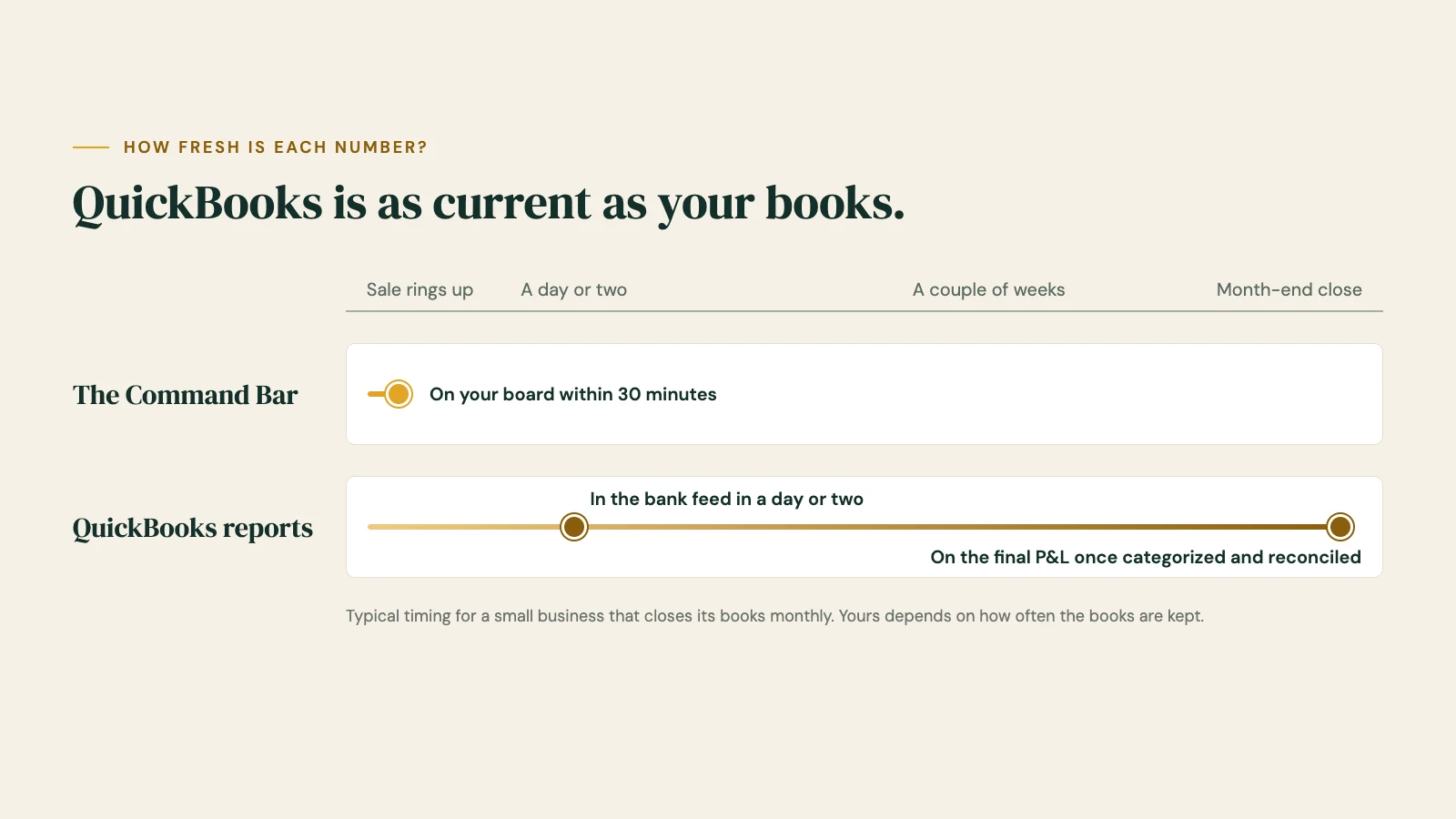
QuickBooks is as current as your books
Here's the catch. A bank feed brings transactions in, but someone still has to categorize them, match deposits to sales and reconcile the accounts. For a lot of small businesses that happens once a month, often by a bookkeeper. Until then, this month's profit and loss is a draft.
That's fine for taxes. It's not great for deciding on Tuesday whether to place a big order on Wednesday.
It wasn't built for the shop floor
QuickBooks sees your money, not your shop floor. On its own, it doesn't know which products are selling at which store, what you should reorder, what to move from one location to another, how Saturday did against last year's Saturday, or who sold what on the floor. That detail lives in your point of sale, and getting it into your books cleanly takes a connector app and regular cleanup.
The Command Bar reads your point of sale directly and puts that detail next to your cash and bills, so the day-to-day picture doesn't wait for the books to close.
QuickBooks reports vs the Command Bar, side by side
| QuickBooks reports | The Command Bar | |
|---|---|---|
| Cost | Simple Start $38 a month; Plus $140 a month (list prices) | From $1,500 setup and $199 a month, alongside QuickBooks |
| Official books, P&L and taxes | Yes, the record your accountant uses | No. It's not accounting or tax advice |
| How current the numbers are | As current as your categorizing and reconciling | Every 30 minutes |
| Bank balances and bills | Yes, through bank feeds and bill pay | Yes, view-only |
| Cash forecast | About 90 days, from your bank history | 13 weeks, after every bill |
| Sales by product, store and day | Only what a connector app syncs in | Yes, from your point of sale |
| What to reorder or move | Inventory tracking on Plus | Order Now and Move Stock lists (Full plan) |
| Sales vs last year with the weather | Reports you set up | Built in, by day |
| Built for | You and your accountant, at month end | You, every morning |
| Tells you what to do | An AI assistant that answers questions | A Monday memo with three things to do |
When QuickBooks is enough
We'd rather tell you straight:
- Your books are kept up every week, not once a month.
- You run a service business or one location without much stock.
- You're comfortable reading a profit and loss and it gives you what you need.
When the Command Bar is the better choice
- Your books close monthly, and you need to know where you stand in between.
- You carry stock and need to know what to reorder and what to move.
- You run more than one location.
- You want the three things to do this week, not a report to read.
Use both
Most owners should keep both. QuickBooks keeps the books, your accountant keeps working in it, and nothing about that changes. The Command Bar reads QuickBooks Online alongside your point of sale and your bank, view-only, so you get the daily picture without touching the official record.
How setup works
- A short intake call. Tell us your systems, your stores and your bills, and we give you a go-live date.
- You connect your accounts with view-only access. We never ask for your passwords.
- We build your board and walk you through it. Billing for the month only starts when your board goes live.
QuickBooks Online is already built, so we switch it on during setup. Your bookkeeper keeps working exactly as before.
Questions
Does the Command Bar replace QuickBooks?
No. QuickBooks stays your official books for your accountant and your taxes. The Command Bar shows the day-to-day picture next to it.
Will it change anything in my books?
No. Every connection is view-only. It can't post, edit or delete anything in QuickBooks, and it can't move money.
Does it work with QuickBooks Online?
Yes. QuickBooks Online is built and ready, and we switch it on during your setup.
Why don't the numbers always match my QuickBooks P&L to the penny?
The board shows what's happening now, before your books are categorized and reconciled. Your accountant's books are the final word for taxes; the board is for running the week.
Do I still need a bookkeeper?
Yes. Your bookkeeper and accountant keep doing their jobs. It usually helps when the owner already knows where things stand.
What does it cost?
Core is $1,500 to set up and $199 a month. Full is $3,000 and $349 a month. That's launch pricing for our first ten businesses, locked for the first year. See plans
Keep your books. See your week.
View-only access · Nothing can move your money · Your data stays yours
QuickBooks list prices and features from quickbooks.intuit.com, October 2026, before promotional discounts. QuickBooks is a trademark of Intuit Inc.; Bar None Solutions isn't affiliated with Intuit.
MORE COMPARISONS
Spreadsheet vs dashboard: why your numbers are old the moment you hit send
Why your numbers are old the moment you hit send, and when a spreadsheet is still the right tool.
Shopify reports vs the Command Bar: what Shopify can't see
Shopify's reports are good at sales and stock. Here's what they can't see, and why most owners keep both.
Square Dashboard vs the Command Bar: the money outside Square
Square shows what runs through Square. Here's the money it can't see, and why Square owners can keep both.