
COMPARE
Shopify reports vs the Command Bar: what Shopify can't see
Shopify runs your register, your online store and your stock, and its reports are better than most owners realize. But Shopify only sees what happens inside Shopify. Your bank, your bills and your payroll live somewhere else.

Shopify's reports are better than most owners think
Every Shopify plan comes with more than 200 reports. On the inventory side alone you get sell-through rate, ABC analysis, days of stock left and a month-end inventory value. There's a built-in AI assistant that answers questions about your store. If your question is "what sold yesterday" or "which products are moving," Shopify can answer it.
So this isn't a page about Shopify being weak. It's about where Shopify stops.
What Shopify can't see
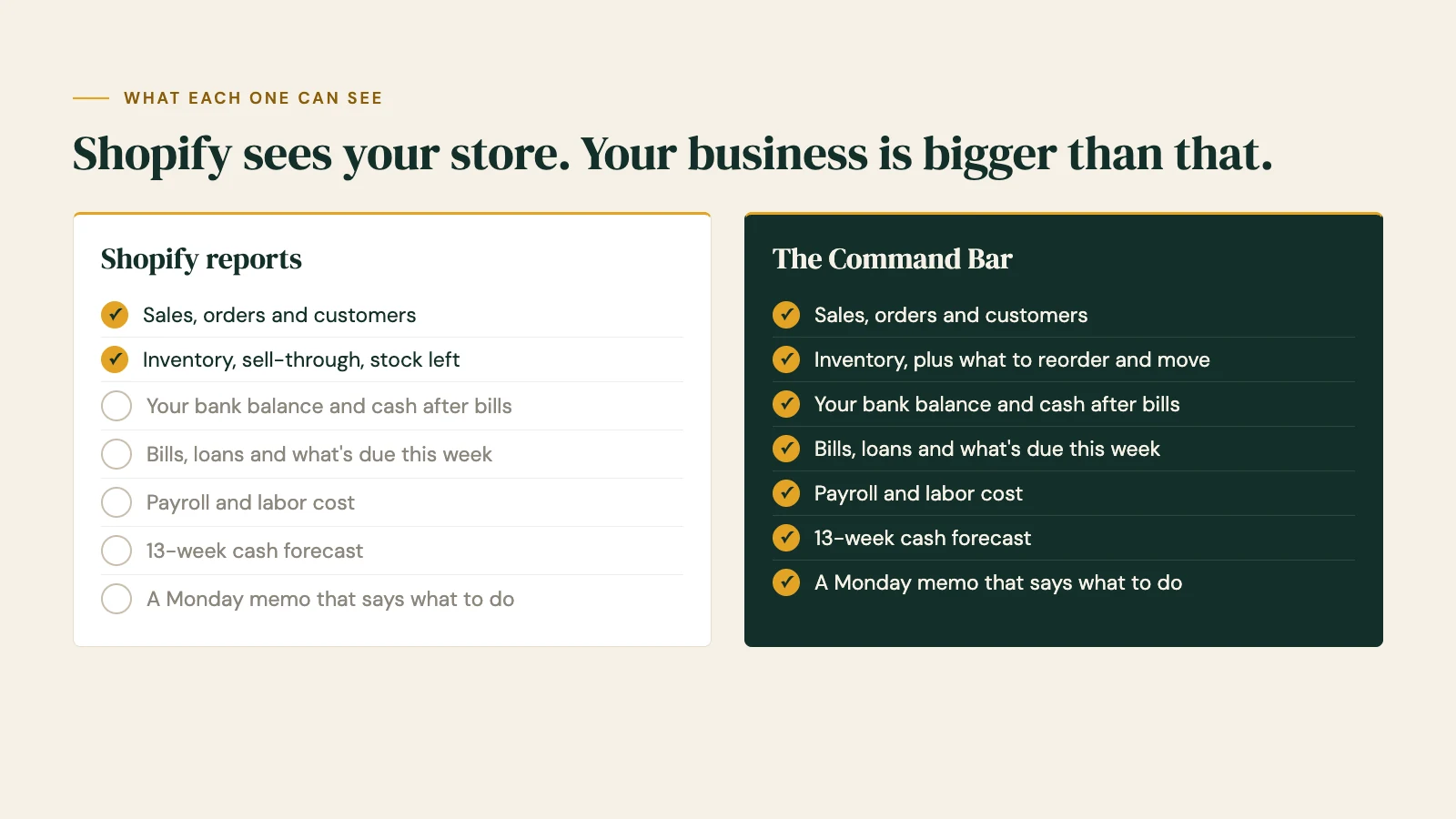
Shopify knows every sale. It doesn't know what's in your bank account after rent clears, what's due to your distributor on Friday, what payroll costs this week, or whether you'll have enough cash in eight weeks when the slow season hits.
That's the part of the business that keeps owners up at night, and it lives in your bank, your bills and your payroll, not in your store.
Two hundred reports is a lot of digging
Shopify's reports answer the questions you know to ask. You still have to know which report to open, set the dates, compare it to last year and work out what it means for this week.
The Command Bar works the other way around. It reads your Shopify sales and stock every 30 minutes, puts them next to your cash, bills and payroll, and every Monday a short memo tells you the three things to do this week: what to reorder, what to move between stores, what bill is coming.
Margins need your real costs
Shopify's profit numbers are only as good as the cost you typed into each product. Your real margin also depends on what you actually paid this month, and that lives in your bills and your books.
Getting Shopify and QuickBooks to agree takes a connector app and regular cleanup. In our own stores, that's exactly where the numbers drifted. The Command Bar reads both sides, your sales from Shopify and your costs from your bills and bank, so your margins and your cash tell the same story.
Shopify reports vs the Command Bar, side by side
| Shopify reports | The Command Bar | |
|---|---|---|
| Cost | Included with your Shopify plan (Basic from $29 a month, billed yearly; POS Pro $89 a month per location) | From $1,500 setup and $199 a month, on top of Shopify |
| Sales, orders and customers | Yes | Yes, read from Shopify every 30 minutes |
| Inventory and sell-through | Yes | Yes, plus Order Now and Move Stock lists (Full plan) |
| Your bank balance and cash after bills | No | Yes, from a view-only bank feed |
| Bills and what's due this week | Only bills you pay through Shopify Bill Pay | Every bill and loan, with due dates |
| Payroll and labor cost | No | Yes |
| 13-week cash forecast | No | Yes |
| Sales vs last year with the weather | Year-over-year reports you set up | Built in, by day |
| Tells you what to do | Answers the questions you ask | A Monday memo with three things to do |
| Systems outside Shopify | Through separate apps | Bank, payroll and accounting on the same screen |
When Shopify's reports are enough
We'd rather tell you straight:
- You run one location, your bills are simple, and you check the bank yourself without much worry.
- You mostly want to know what's selling, and Shopify already answers that.
- You're happy spending time in the reports and you know which ones to open.
When the Command Bar is the better choice
- You want to know your cash after every bill, not just your sales.
- You run more than one location and need to know what to move before you reorder.
- Your margins in Shopify and your books never quite match.
- You'd rather be told the three things to do than dig through 200 reports.
Use both
It isn't either-or. Shopify stays your register, your store and your stock. The Command Bar reads from it, view-only, and adds the rest of the business around it. Nothing about how you or your staff use Shopify changes.
How setup works
- A short intake call. Tell us your systems, your stores and your bills, and we give you a go-live date.
- You connect your accounts with view-only access. We never ask for your passwords.
- We build your board and walk you through it. Billing for the month only starts when your board goes live.
Shopify is ready today, so most of setup is connecting your bank, bills and payroll.
Questions
Does the Command Bar replace Shopify?
No. Shopify stays your point of sale and your online store. The Command Bar reads from it and adds your bank, bills and payroll on one screen.
Does it work with Shopify POS?
Yes. Shopify is ready today, for both your stores and your online sales.
Will it change anything in my Shopify store?
Core only reads. Full can also send stock changes back to Shopify, like a transfer between stores, and nothing can ever move your money.
Isn't Shopify's AI assistant enough?
It's good at answering questions about your store. It works from your Shopify data, so it can't see your bank, your bills or your payroll, and it waits for you to ask.
Do I need QuickBooks too?
No. If you use QuickBooks Online, the Command Bar can read it. If you don't, your bank feed and bills cover the cash side.
What does it cost?
Core is $1,500 to set up and $199 a month. Full is $3,000 and $349 a month. That's launch pricing for our first ten businesses, locked for the first year. See plans
Keep Shopify. See the rest of your business.
View-only access · Nothing can move your money · Your data stays yours
Shopify prices and features from shopify.com and the Shopify Help Center, October 2026. Shopify is a trademark of Shopify Inc.; Bar None Solutions isn't affiliated with Shopify.
MORE COMPARISONS
Spreadsheet vs dashboard: why your numbers are old the moment you hit send
Why your numbers are old the moment you hit send, and when a spreadsheet is still the right tool.
Square Dashboard vs the Command Bar: the money outside Square
Square shows what runs through Square. Here's the money it can't see, and why Square owners can keep both.
QuickBooks reports vs the Command Bar: your books vs your week
QuickBooks keeps your books. Here's why the day-to-day picture needs something faster, and why owners keep both.